Turning IDN edge cases into typosquats
Overview#
"Check the address bar" is the one piece of security advice everybody has heard. It assumes the name there can be read correctly, which held while domain names could only contain English letters, digits, and a hyphen. Since 2003 they can use almost any writing system, so a Berlin bookshop can be . Many of those characters look identical to Latin ones. Cyrillic has its own , , , , and , which most fonts draw like Latin , , , , and but applications treat as different characters. A name can therefore look like without being it.
Chromium (the engine behind Chrome, Edge, and other browsers), which this post examines most closely, applies a display check. If a name looks built to deceive, the address bar shows its encoded Punycode form, such as xn--80ak6aa92e.com, instead. Mail clients make their own choice about how to draw a sender's address, and registries decide separately which characters a name may contain.
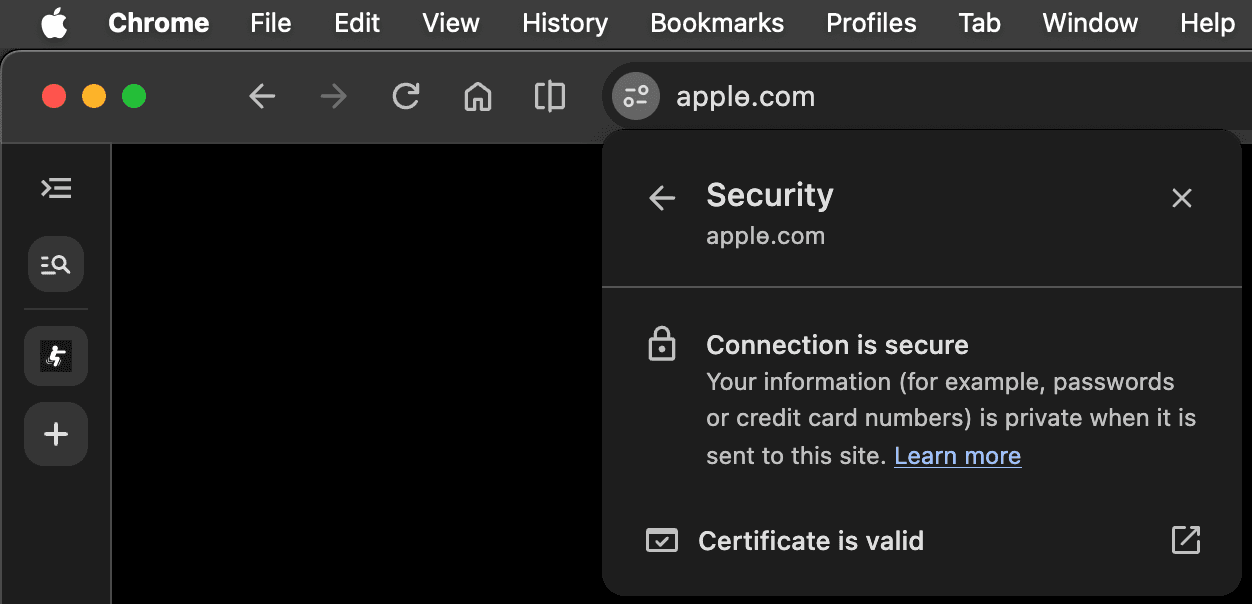
This research investigates whether it is still possible to register a domain that looks like a well-known one and have Chromium-based browsers render it close to the real thing. The screenshot below shows Chrome 154 displaying , a Cyrillic lookalike of registered for this research, in Unicode with a valid certificate. The rest of this post explains how that was possible.
The case of аррӏе.com#
In April 2017, Xudong Zheng registered . Every character before .com is Cyrillic, and Chrome, Firefox, and Opera all drew it as something almost indistinguishable from . Browsers at the time hid the Unicode form of a name only when its characters came from more than one writing system (commonly referred to as a "script"). Zheng showed that a name built entirely from one non-Latin script was able to bypass browser checks and render a virtually indistinguishable version of a real domain. Chromium addressed this issue by introducing a "Whole-Script Confusable" (WSC) check that has held since. The job of the WSC check is to catch DNS labels written entirely in Cyrillic characters that all look like Latin ones. If a label does not pass this check, it is shown in its raw xn-- Punycode encoding instead.
encodes as xn--80ak6aa92e.com
Chromium has shown that name as Punycode ever since. With the 2017 fix long settled, this research takes a fresh look at how Chrome handles internationalized domain names (IDNs) and finds two edge cases that still let a convincing lookalike through. The first is in the whole-script confusable check. Cyrillic , a letter used in Kazakh, Mongolian, and Tatar, is not on Chromium's lookalike list, so displays in Unicode with no warning. The second is in Latin. A character with a hook, such as , keeps its mark through Chromium's skeleton comparison, so does not reduce to . The bar on survives the same way. Have I Been Squatted registered the 20 lookalikes below as a proof of concept.
encodes as xn--80a6aa68c8d.com
The sections below test against Chromium's display rules, its navigation warnings, and IDN registry tables, and take a brief look at how Gmail and Outlook Web handle these domains.
How Chromium decides what to render#
When Chromium is about to show in the address bar, it has to choose between displaying the A-label (xn--80a6aa68c8d.com) and the U-label () of that domain. The policy is built on Unicode Technical Standard #39 (UTS #39), which specifies which scripts may be mixed, which characters count as confusable, and how to reduce a string to a comparison "skeleton". Chromium runs the first part of the check through International Components for Unicode (ICU), configured with a narrowed set of allowed characters, and then applies rules of its own.
         xn-- label
              │
              │
┌─────────────▼───────────────┐
│ [STAGE 1] per label         ├── any check fails ───┐
│ `SafeToDisplayAsUnicode()`  │                      │
│ 7 checks, first fail wins   │                      │
└─────────────┬───────────────┘                      │
      every label passes                             │
              │                                      │
              │                                      │
┌─────────────▼───────────────┐                      │
│ [STAGE 2] whole hostname    ├── skeleton matches ──┐
│ `GetSimilarTopDomain()`     │                      │
│ vs 8,462 bundled domains    │                      │
└─────────────┬───────────────┘                      │
              │                                      │
          no match                                   │
              │                                      │
              │                                      │
    ╔═════════▼════════╗                   ┌─────────▼────────┐
    ║     Unicode      ║                   │     Punycode     │
    ╚══════════════════╝                   └──────────────────┘
The decision has two stages, and a name has to pass both to show as Unicode. Stage 1 checks each xn-- label on its own through SafeToDisplayAsUnicode(), with the top-level domain (TLD) as context. Stage 2 checks the whole hostname against a list of popular domains.
Stage 1 SafeToDisplayAsUnicode()#
Stage 1 runs seven checks on each label in a fixed order, and the first one that fails sends the name to Punycode. Only a hostname whose labels all pass reaches stage 2. The walkthrough below takes each check in turn with as the running example, and shows what the check tests, a name it blocks, and why passes.
Chromium's display checks, in order
#1 ICU spoof
аррӏө.com passes
All five letters are Cyrillic, and none is among the characters Chromium removes.
Blocked here, shown as Punycode
xn--pple-43d.com
From
One Cyrillic а in front of Latin pple mixes scripts.
This check does two things simultaneously.
Script mixing detection. Every Unicode character belongs to a "script" (Latin, Cyrillic, Greek, and so on). Chromium configures ICU's spoof checker with USPOOF_HIGHLY_RESTRICTIVE, ICU's name for the Highly Restrictive level from UTS #39, via uspoof_setRestrictionLevel() in idn_spoof_checker.cc. That setting rejects labels that mix scripts in unsanctioned ways.
For instance, one Cyrillic inside an otherwise Latin word such as will cause Chromium to show Punycode, whether or not the characters look alike. The only mixes permitted pair Latin with a Chinese, Japanese, or Korean (CJK) writing system, because those languages routinely write Latin words alongside their own scripts. This is why has to be Cyrillic all the way through.
The check runs on every label, subdomains included. A registry's IDN table can refuse a mixed-script name at the time of domain registration, but the owner of a domain can create any subdomain under it, so for subdomains this check is the only barrier.
Character allowlist. Not every Unicode character is even eligible to appear. Chromium maintains a curated set of "allowed" characters starting from ICU's recommended and inclusion sets, then removing entire blocks and individual code points known to be dangerous, such as Pinyin , dotted from the start of Latin Extended Additional, and Greek . If a label contains any character outside this set, even one that is valid Unicode and used in some language, Chromium rejects the whole label without checking anything else. is not among the characters Chromium removes, so clears this part of the check.
#2 Icelandic
аррӏө.com passes
The label has no þ or ð.
Blocked here, shown as Punycode
xn--orn-ooa.com
From
þ is allowed only under .is and .fo.
Not every character is safe under every TLD. Chromium allows Icelandic thorn and eth only on .is (Iceland) and .fo (the Faroe Islands). On any other TLD, a label that contains either character is shown as Punycode.
#3 Latin schwa
аррӏө.com passes
The label has no ə.
Blocked here, shown as Punycode
xn--kbab-v6b.com
From
ə is allowed only under .az.
Chromium allows Azerbaijani schwa only on .az (Azerbaijan). On any other TLD, a label that contains it is shown as Punycode.
#4 Middle dot
аррӏө.com passes
The label has no middle dot.
Blocked here, shown as Punycode
xn--collegi-xma.com
From
The middle dot is allowed only as l·l under .cat.
Chromium allows the middle dot only as the Catalan ela geminada on .cat. On any other TLD, or in any other pattern, the label is shown as Punycode.
#5 Script mix
аррӏө.com continues
The label is single-script Cyrillic with no combining marks, so it goes to the whole-script check.
This step decides which of the next two checks a label should be routed to, using the restriction level ICU reported in check #1. A label written in a single script, with no combining marks or special-case Japanese kana, goes to the whole-script confusable check (check #6). A label that mixes scripts in one of the ways check #1 permits, such as Latin with Japanese, or that carries combining marks, skips check #6 and goes to the dangerous-pattern check (check #7). is Cyrillic throughout with no combining marks, so it goes to check #6.
#6 Whole-script
аррӏө.com passes
is not on the Cyrillic lookalike list, so the whole-script rule stands down. The label is single-script, so the function returns safe here.
Blocked here, shown as Punycode
xn--80ak6aa92e.com
From
Every letter is on the lookalike list, and .com is not exempt.
The whole-script confusable (WSC) check is the rule that was introduced in Chrome 58 to catch domains like . It targets a label written in a single script, such as Cyrillic, in which every character is a Latin confusable.
Chromium maintains a list of 29 Cyrillic characters that resemble Latin letters ( for , for , for , for , for , and so on). If the label is single-script Cyrillic and every character is on this list, Chromium concludes that this is Latin impersonation and shows Punycode. Some legitimate Cyrillic words happen to be composed entirely of such characters, so Chromium also keeps a hardcoded allowlist of 12 words, including (park), (theater), and (course).
The same logic applies to 16 other scripts, such as Armenian, Greek, and Georgian, each with its own list. A script's check also stands down under TLDs that legitimately use that script. For example, Cyrillic whole-script confusables get a pass on .ru, .ua, and .bg, among others, Greek on .gr, and Armenian on .am. The Cyrillic list is the largest and the most relevant, because it covers enough Latin letters to spell whole English words. Chromium added to it on 11 September 2026, taking it from 28 to 29 characters. That landed after Chrome 155 branched, so Chrome 155 still ships the 28-character list and a later release carries the 29th.
A digit lookalike check runs at the same point. If a label contains only digits and characters that look like digits ( for , for ), Chromium shows Punycode for names such as .
The rule is all-or-nothing. If even one Cyrillic character in the label is not on the list, this check does not reject the label. is not on the list.
#7 Patterns
аррӏө.com not run
Check #5 sent this single-script label to check #6, so it never reaches this branch.
Blocked here, shown as Punycode
xn--appe-df5f.com
From
Latin with Han passes check #1, but 丨 is a CJK lookalike next to Latin letters.
This check handles the edge cases that checks #1 and #6 do not cover. It sees labels that mix scripts in a permitted way, such as Latin with Japanese, and single-script labels that contain combining marks. Chromium looks for patterns such as the following.
- Non-ASCII Latin mixed with non-Latin. A label with accented Latin characters and characters from a script outside the Latin-Greek-Cyrillic family is considered suspicious.
- Combining mark tricks. A combining dot above placed after , , or can fake other characters, like turning into something that looks like .
- Katakana slash lookalikes. Katakana , , , and resemble and could fake path separators.
- Japanese punctuation out of context. The Katakana middle dot next to a Latin letter, or the prolonged sound mark after anything other than Japanese kana.
- CJK lookalikes at a boundary. CJK characters that resemble Latin letters or punctuation, such as (a hyphen) and (an ), placed next to non-CJK characters.
never reaches this check. It uses one script and has no combining marks, so check #5 sent it to check #6 instead.
One character off the list#
The whole-script confusable (WSC) rule is all-or-nothing, so a single Cyrillic character that is not on the lookalike list keeps the whole label out of it. This post calls that character a "breaker". A useful WSC breaker has to satisfy three conditions at once.
- It sits in Chromium's allowed Unicode set, so it clears check #1.
- It is missing from the Cyrillic lookalike list, so check #6 does not fire.
- It still looks enough like a Latin letter that a reader can mistake it for the letter it replaces.
Under ICU 78 and the 29-character list, 64 lowercase Cyrillic characters meet conditions 1 and 2. The table lists the breakers this research identified. The first three meet conditions 1 and 2 today. The last two met condition 1 only before Chrome 148.
| Character | Code point | Resembles | Chrome 148 and later |
|---|---|---|---|
U+04AF | Allowed | ||
U+04E9 | , | Allowed | |
U+0457 | Allowed | ||
U+048F | Rejected (Unicode 17 marks it uncommon) | ||
U+04FF | Rejected (Unicode 17 marks it uncommon) |
Unicode 17.0 moved and from Recommended to Uncommon_Use, and ICU's recommended set follows that table. Chrome 148, released in May 2026, moved to ICU 78.2, which carries Unicode 17, so both characters now fail check #1. Chrome 147 and earlier accept all five.
This is the mechanism behind the name in the introduction. Every character in is on the lookalike list, so the whole-script rule rejects it. Swap the final for , which is not on the list, and the verdict flips.
from idn_checker import get_checker

get_checker().safe_to_display_as_unicode("аррӏе", "com", "com")
# IDNSpoofCheckerResult.kWholeScriptConfusable -> Chromium shows punycode

get_checker().safe_to_display_as_unicode("аррӏө", "com", "com")
# IDNSpoofCheckerResult.kSafe -> Chromium shows Unicode
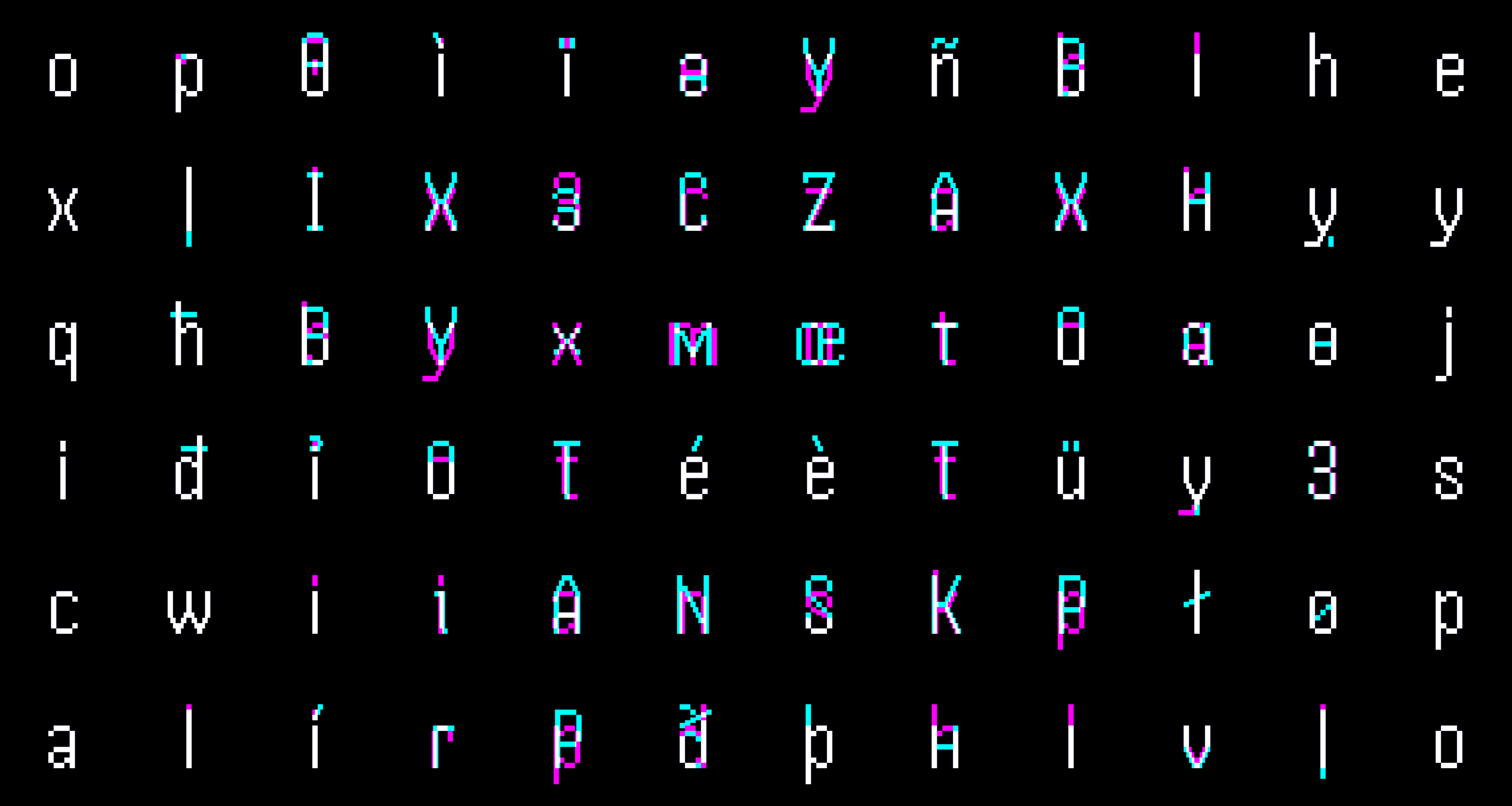
Have I Been Squatted registered along with 14 other Cyrillic names that use for , among them (), (), and (); the address-bar grid above shows them. All of them show Unicode in the Chrome 154 address bar at the time of writing, as in the screenshot in the overview.
Two more conditions decide whether a breaker is useful. The whole label has to be written in Cyrillic, and the name also has to pass stage 2, covered in the next section. The first condition rules out many words. , , , , , , and have no Cyrillic substitute in Chromium's allowed set, and Chrome 148 also removed the substitutes for and . Every letter in has a Cyrillic form, which is why is possible at all. A Cyrillic spelling of would have to keep Latin , so it mixes scripts and fails check #1 before any breaker matters. Greek has the same whole-script rule with far less room. Only and are both off its list and in Verisign's .com Greek IDN table, so this post does not treat Greek as a practical route for typosquats.
Stage 2 GetSimilarTopDomain()#
Stage 2 runs only when every label passes stage 1, and it looks at the whole hostname rather than one label. Chromium reduces the hostname to one or more comparison strings, called skeletons, and compares them against a bundled list of popular domains. A match for a different site sends the entire hostname back to Punycode, even though every label passed stage 1. The skeletons are built in four steps.
- Strip diacritics. The label is decomposed into base characters and combining marks (Unicode Normalization Form D), the marks are removed, and the result is recomposed. becomes , and becomes .
- Generate variants for ambiguous characters. could be an or an , so Chromium generates a variant for each reading.
- Map confusables to ASCII. Chromium's own additions to the Unicode list convert lookalikes such as to , to , and to .
- ICU skeleton computation. A final pass applies the UTS #39 confusable mappings to each variant and produces the comparison strings. Skeletons are built for comparison, not for reading. UTS #39 maps to
rnbecause the two look alike, so becomes . The bundled names go through the same mapping, so the.cornendings still match.
Each resulting skeleton is looked up against Chromium's bundled domain list of 8,462 names, 836 of them in a higher-priority top bucket. At build time, that list is turned into a skeleton table, which is what the runtime check searches. If a generated skeleton matches an entry for a different site, Punycode is displayed for the entire hostname. is in the top bucket.
Whether stage 2 catches a lookalike depends on what happens to the substitute character when the skeleton is built. Some substitutes reduce to a plain Latin letter, so the name matches its target. Others keep a combining mark, so it does not. That difference separates from the accented Latin lookalikes that Chromium catches.
Accents are the simple case. The in is an with an acute accent, and the accent is removed when Chromium strips diacritics. What remains is , an exact match for the real name. An accented spelling of a bundled-list name is therefore shown as Punycode.
A hook or a stroke, on the other hand, behaves differently. is stored as a single character rather than a base character plus a separate mark, so diacritic stripping has nothing to remove. The confusable mapping that runs afterward rewrites it as followed by a combining mark , and because stripping has already happened, the mark stays in the skeleton. ends up one character away from the real name instead of matching it. Cyrillic works the same way, becoming plus a combining bar . In it stands in for , so the skeleton, , differs from in two places, the and the bar. That is why the name escapes the bundled list even though is in the top bucket. , by contrast, reduces to exactly , because maps to a plain ; however, it passes display only because is not on the list.
against . The accent is removed, and the skeleton matches the target.
against . The hook stays as a combining mark, one code point off the target.
against . The bar stays as a combining mark after o, two code points off the target.
This settles the second breaker condition. Most names are not on the bundled list, so any breaker passes stage 2 for them. and are on it, so their lookalikes need a breaker such as that leaves a mark in the skeleton.
Latin lookalikes get through the same way. Chromium keeps no whole-script list for Latin, because one would also flag ordinary names such as and . An accented Latin label therefore passes stage 1, and stage 2 protects only the 8,462 names in its list.
A Cyrillic lookalike label has to replace every letter, while a Latin one can change just one. has no Cyrillic lookalike at all, because Cyrillic has no , but it has many Latin ones. Stage 2 stops only a name whose skeleton exactly matches one on its list, so anything that keeps a mark, or targets a name off the list, gets through. The figure below runs both stages on the names in this section. Swap a character to see which check decides the outcome.
- aа0430
- lӏ04CF
breakeron the listLatin or not allowedselect to swap
Passes both stages
One character is off the list, so the whole-script rule stands down, and the skeleton matches nothing in the bundled table.
Skeleton of apple.com above, this label below
Navigation-time warnings#
Unicode display is not the last check. When a page loads, a separate lookalike check (LookalikeUrlNavigationThrottle in Chromium) can block the page or warn about it even when the address bar shows Unicode. It can show an interstitial, a full-page warning that asks whether the visitor meant the real site, or a "Safety Tip" bubble next to the address bar that does not block the page.
This check builds the same skeletons as the display check and compares them against two lists.
- Sites the visitor uses regularly. Chromium scores the frequency of visits to each domain, and any domain visited at medium frequency or above counts. An exact skeleton match against one of these sites shows the interstitial.
- The bundled list of 8,462 domains. An exact match against one of the 836 top-bucket domains shows an interstitial; against any other domain on the list, a Safety Tip.
When no skeleton produced an exact match, Chromium looks for a near match. That is, a skeleton that differs from a known domain's skeleton by one edit (one character added, removed, or replaced), or by one swap of two neighboring characters. Chromium skips this step for targets shorter than five characters before the TLD. As a result, lookalikes of get no near-match check at all. Against an engaged site, one edit or one swap shows a Safety Tip. Against the top bucket, only one swap shows a Safety Tip. One edit is recorded in metrics but not shown.
The visitor's history therefore decides the result. A new visitor has no visited sites to compare with, only the bundled list, and a match there would already have produced Punycode. So even , whose skeleton matches exactly, loads with no warning, while a visitor who uses gets an interstitial. is two edits from , and is one edit from , which is too short, so both load with no warning even for daily users of the real site. The figure below runs these names through each check for both kinds of visitor.
Skeleton of apple.com above, this candidate below, 2 edits apart
The barred letter stands in for e, so the skeleton ends in o plus a bar, two edits from apple. The near-match comparisons allow one.
- 1
Engaged site, exact skeleton match
Interstitial
No match
- 2
Bundled list, exact skeleton match
Interstitial for the 836 top-bucket names, Safety Tip for the other 7,626. A match here already has Punycode in the address bar. This check reads the display check’s own top-domain result.
No match
- 3
Engaged site, one edit or adjacent swap
Safety Tip. The target needs 5 or more characters before the TLD.
No match
- 4
Top-bucket name, adjacent swap
Safety Tip. A one-edit top-bucket match only records metrics.
No match
No lookalike warning. The address bar shows Unicode.
Lookalikes already delegated in .com#
Names like аррӏө.com can be registered in .com, so the next question is how many already have been. The .com zone file, obtained through ICANN's Centralized Zone Data Service in October 2026, held 167,226,216 delegated names, 733,509 of them in xn-- form. For each IDN, its non-ASCII characters were replaced with the ASCII characters they resemble, and the result was kept as a pair when that ASCII name was also delegated in .com. That left 161,894 pairs, covering 133,953 distinct ASCII names. Each pair is a potential imitation, not a confirmed typosquat. It only shows that one registered name looks like another.
Lookalike pairs in the .com zone
167,226,216
delegated .com names
733,509
of those names in IDN form
154,567
of those resemble an ASCII .com name
Those 154,567 IDNs formed 161,894 lookalike pairs with the ASCII names they resembled. Most resembled one ASCII name, but 7,009 resembled two or more and added 7,327 pairs. amazōn.com, for example, paired with both amazon.com and arnazon.com.
Of those pairs, 102,592 were exact matches. For each ASCII name, up to 500 lookalike spellings were generated, keeping only spellings that passed Chromium's stage 1 checks. A pair is an exact match when the IDN is one of those spellings and Chromium displays it in Unicode. All but 42 were Latin. Of the rest, 20 were Greek, such as , 15 were Cyrillic, 4 were Arabic, and 3 were Han. The other 59,302 pairs were reverse-confusable. Their IDN mapped back to the ASCII name but was not one of the generated spellings, for example because it relied on looking like rn, or it was a generated spelling that Chromium displays as Punycode (1,224 of them). Chromium displays 12,780 of these 59,302 as Punycode and the other 46,522 in Unicode.
A lookalike name is not necessarily malicious. Some are defensive registrations, multilingual sites, or unrelated businesses.
IDNs in webmail clients#
Email has the same problem, but there, the mail client decides how to show the sender's domain, not the browser. Chromium's checks only run on the hostname in the address bar. If a webmail service decodes the A-label before sending the page, the browser receives plain Unicode text and checks nothing.
, , , , and are accented spellings of names on Chromium's bundled list, so Chromium would show all five as Punycode at stage 2. Gmail showed all five in Unicode.
The table shows how each client displayed the sender domains tested. The Chromium column comes from Chromium's display checks run offline, and the Gmail and Outlook Web columns come from captures of test mailboxes.
| Sender domains | Chromium address bar | Gmail Web | Outlook Web |
|---|---|---|---|
| , | Unicode | Unicode | A-label |
| , | Unicode | Unicode | A-label |
| , , , , | Punycode (top-domain match) | Unicode | A-label |
| , | Unicode | Unicode | A-label |
In testing, Gmail and Outlook Web took opposite approaches. Of 20 internationalized senders, Gmail showed all 20 in Unicode and Outlook Web showed all 20 as A-labels. Two ASCII senders served as controls. Gmail kept the From line in Unicode and showed the Punycode form only in the separate mailed-by: field, which is not the address a reader checks. Outlook Web printed A-labels even for ordinary names such as and . Gmail also showed in Unicode, as it did Zheng's , which Chrome has shown as Punycode since 2017, and . Outlook Web printed [email protected] and [email protected]. Neither client checked for lookalikes. Gmail decoded everything, and Outlook Web decoded nothing.
Each test message carried the sender domain as an A-label in its From header, because mail headers traditionally use ASCII. The messages were imported through each provider's API into a researcher-owned mailbox. Both mail clients were kept at their default settings. The recorded result is the address the opened message showed. Spam filtering, sender reputation, and link scanning are separate systems and were not measured.
Summary#
This research followed through the .com registry, Chromium's display and navigation checks, and two webmail clients. It started from , the 2017 lookalike that Chromium learned to catch, and a single change, the final swapped for . Verisign's .com Cyrillic table includes because it is a Kazakh letter, so the name could be registered. Stage 1 of Chromium's IDN checks passed it because is not on Chromium's Cyrillic lookalike list. Stage 2 passed it because leaves a bar in the skeleton, which then no longer matches . Chromium's navigation-time checks passed it as well, because the skeleton is two edits from and Chromium looks for one. In email, Gmail showed it in Unicode, and only Outlook Web showed the A-label.
Latin lookalikes took the same path. A hook such as survives into the skeleton, and a short target such as gets no near-match check at all. Each layer made its decision on its own, and none of them checked what the others had decided.
Recommendations#
Chromium's IDN checks are among the strictest in any browser, and they still trade some security for usability. Gmail and Outlook Web make different trade-offs again, and browser updates close gaps one character at a time, as Chrome 148 did for and . The right defense depends on what an organization controls and how often it deals with IDNs, but the following steps apply to most.
- Register the lookalike spellings of protected domains that survive a skeleton comparison, such as those built with , , or . Accented spellings of names on Chrome's list are already caught.
- Register the hooked and stroked spellings of any brand with four characters or fewer directly, because Chrome gives those names no near-match protection.
- Monitor new
xn--registrations within two edits of each protected domain. - Use the mail gateway's existing controls. Gmail shows every IDN sender in Unicode, and SPF, DKIM, and DMARC all pass for a lookalike the attacker owns. Turn on the gateway's lookalike or impersonation protection for the organization's own domains, add a rule that tags inbound mail from
xn--sender domains, and keep external-sender banners on. - Use phishing-resistant MFA (FIDO2/passkeys). A passkey registered on will not answer a login page on
xn--80a6aa68c8d.com, whatever the address bar shows. - Treat
xn--names as a signal in DNS and proxy logs. Most organizations rarely resolve IDN domains or receive mail from them, so log, banner, or block them outside an allowlist. This works on the encoded name, which no display choice can hide.
Domain protection
Detect adversary infrastructure while it is being staged.
Have I Been Squatted helps security teams detect lookalike domains, certificate and DNS changes, and staging infrastructure, investigate the evidence, and coordinate takedowns.